
ONLINE BANKING

SecureNow FAQs

Financial Help and Hope at Your Fingertips

Financial Help and Hope at Your Fingertips
What is SecureNow?

SecureNow is an online and mobile banking security feature designed to help protect your personal and financial information. It adds an extra layer of identity verification when logging in by using a multi-factor authentication (MFA).

With SecureNow, you verify your identity using a one-time verification code sent by text or voice call. This security practice—also known as multi-factor authentication or one-time passcode (OTP)—is widely used and familiar to many through other apps and websites.

At the first login after SecureNow is enabled, you will be guided through a one-time setup process. you will:

  1. Enter your current username and security code (password)
  2. Choose whether to receive verification codes by text message or voice call
  3. Confirm your phone number (or add a new one)
  4. Receive and enter a 6-digit verification code
  5. Successfully access online banking

Ensure your cell phone number is current in online banking.

To verify or update a phone number:

  • Go to Settings >> Profile>> Phone Number

No.

Most members will only be asked for a verification code occasionally. On average, you will  experience a 5%–9% MFA challenge rate, meaning the vast majority of logins will not require a code.

Verification codes are triggered by risk-based factors, such as:

  • Signing in from a new device
  • Signing in from a new location or IP address
  • Unusual or highrisk login behavior

Once a device is recognized and trusted, you typically won’t be prompted again unless something changes.

When you log in from a new or unrecognized device, SecureNow triggers multi-factor authentication (MFA).

  • Most verification codes will be delivered by text message.
  • You may also choose to receive the code via automated voice call.
  • You DO NOT need an app to generate a verification code.
  • The code is valid for 10 minutes
  • Each code may be used only once
  • If entered incorrectly, you may try again without being locked out

No. SecureNow relies on one-time verification codes.

  • Text messages: Come from 95416  
  • Voice calls: Come from (678)-498-2706

If you use a spam or call-blocking filter, you may need to:

  • Add the number as a contact, or
  • Temporarily disable the filter

You may choose to receive the verification code through an automated voice call to your landline phone.

To use online and mobile banking, you must complete identity verification.
Text or voice call verification is required as part of SecureNow to protect your account.

Other common challenges include:

  • Entering an expired code
  • Trying to reuse a previously issued code
  • Typing the code incorrectly or missing a digit
  • Delays caused by poor cell service or spam filters
  • They do not need an app to generate a code
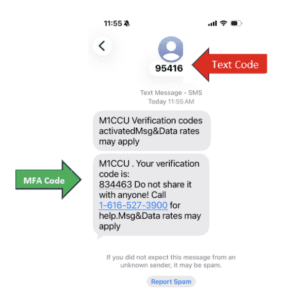
 

You should be reassured that these new security measures are in place to better protect your accounts.

As SecureNow learns your normal activity and behavior, login friction should decrease over time.

Common security assessment factors include:

  • Device type and background (“black box”) data
  • IP address and location
  • Internet connection type and routing
  • Browser version and technical details

Yes. You can add up to five additional phone numbers. Only account owners and authorized parties should be added.

To add numbers:

  • Login to Online Banking>> Go to Settings >> Security and Alerts >> Manage Verification Code Delivery
What is SecureNow?

SecureNow is an online and mobile banking security feature designed to help protect members personal and financial information. It adds an extra layer of identity verification when logging in by using a multi-factor authentication (MFA).

With SecureNow, members verify their identity using a one-time verification code sent by text or voice call. This security practice—also known as multi-factor authentication or one-time passcode (OTP)—is widely used and familiar to many members through other apps and websites.

At the first login after SecureNow is enabled, members will be guided through a one-time setup process. They will:

  1. Enter their current username and security code (password)
  2. Choose whether to receive verification codes by text message or voice call
  3. Confirm their phone number (or add a new one)
  4. Receive and enter a 6-digit verification code
  5. Successfully access online banking

Members should ensure their cell phone number is current in online banking.

To verify or update a phone number:

  • Go to Settings >> Security and Alerts >> Manage Verification Code Delivery

If a phone number is updated in Portico, staff must update the phone in Virtual Branch Next (VBN)/Interact.

No.

Most members will only be asked for a verification code occasionally. On average, members experience a 5%–9% MFA challenge rate, meaning the vast majority of logins will not require a code.

Verification codes are triggered by risk-based factors, such as:

  • Signing in from a new device
  • Signing in from a new location or IP address
  • Unusual or highrisk login behavior


Once a device is recognized and trusted, members typically won’t be prompted again unless something changes.

When a member logs in from a new or unrecognized device, SecureNow triggers multi-factor authentication (MFA).

  • Most verification codes will be delivered by text message.
  • Members may also choose to receive the code via automated voice call.
  • Member DO NOT need an app to generate a verification code.
  • The code is valid for 10 minutes
  • Each code may be used only once
  • If entered incorrectly, members may try again without being locked out

No. SecureNow relies on one-time verification codes.

  • Text messages: Come from 95416  
  • Voice calls: Come from (678)-498-2706

If a member uses a spam or call-blocking filter, they may need to:

  • Add the number as a contact, or
  • Temporarily disable the filter

Members may choose to receive their verification code through an automated voice call to their landline phone.

To use online and mobile banking, members must complete identity verification.
Text or voice call verification is required as part of SecureNow to protect their account.

Using the text code vs. the MFA (multi-factor) code found within the body of the text. 

Other common challenges include:

  • Entering an expired code
  • Trying to reuse a previously issued code
  • Typing the code incorrectly or missing a digit
  • Delays caused by poor cell service or spam filters
  • They do not need an app to generate a code
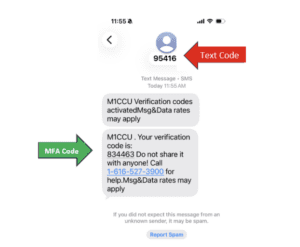
Members should be reassured that these new security measures are in place to better protect their accounts.

As SecureNow learns a member’s normal activity and behavior, login friction should decrease over time.

Common security assessment factors include:

  • Device type and background (“black box”) data
  • IP address and location
  • Internet connection type and routing
  • Browser version and technical details

Yes. Members can add up to five additional phone numbers. Only account owners and authorized parties should be added.

To add numbers:

  • Login to Online Banking>> Go to Settings >> Security and Alerts >> Manage Verification Code Delivery

Yes. Communication was sent to members via:

  • Website pop-up (members must close before entering the site)
  • Ads within online and mobile banking
  • Email notifications to members
  • A red banner displayed at the top of the website


SecureNow will be managed through:

  • Virtual Branch / InteractWEB
  • The SecureNow Administrative Tool

After SecureNow is implemented, all security code (password) changes will trigger a one-time passcode (OTP) sent by:

  • Email, and
  • Text message or voice call


This ensures continued protection during account changes

No. Updates made in SecureNow do not automatically transfer to VBN. Any changes must be updated in VBN to ensure information remains accurate across systems.

You are now leaving Hopesouth Credit Union

Hopesouth Credit Union provides links to web sites of other organizations in order to provide visitors with certain information. A link does not constitute an endorsement of content, viewpoint, policies, products or services of that web site. Once you link to another web site not maintained by Hopesouth Credit Union, you are subject to the terms and conditions of that web site, including but not limited to its privacy policy.

You will be redirected to

Click the link above to continue or CANCEL